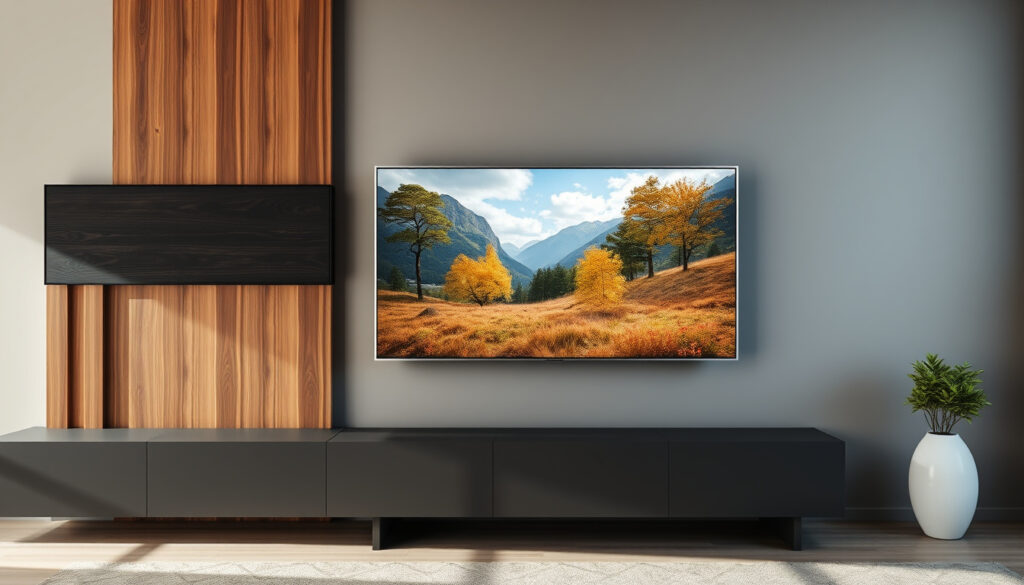
TV Panel Guide: Display Technology vs. Wall Panels
You walk into an electronics aisle and hear “TV panel” thrown around — but is the salesperson talking about the screen technology inside the set or the decorative frame that goes on your wall behind it? That split meaning causes real confusion and can cost you hundreds if you pick the wrong one, so this guide sorts out both sides of the story, from OLED vs LED display tech to how much a wall panel installation runs, to help you make a confident choice.
TV panel market size (2023): $17.2 billion globally ·
OLED panel lifespan: 50,000–100,000 hours ·
Average cost of TV wall panel installation: $200–$500 ·
LCD TVs market share: ~70% of all shipments
Quick snapshot
- TV panel has two distinct meanings: display component and decorative wall panel (Crutchfield, consumer electronics retailer)
- OLED panels produce perfect blacks and high contrast ratios (Crutchfield)
- Repairing a cracked TV panel usually costs 50–80% of a new TV (Alibaba SmartBuy, sourcing marketplace)
- Exact cost of TV wall panel installation varies by region, materials, and labor rates
- Future dominance of QD-OLED vs microLED is uncertain as both technologies are evolving rapidly
- LCD (LED-backlit) TVs hold ~70% of global shipments by volume (Crutchfield)
- OLED panel prices have dropped ~40% since 2020, narrowing the gap with LED (Alibaba SmartBuy)
- QD-OLED and microLED emerging as premium-tier display options for home theaters (DOIT VISION, commercial display manufacturer)
- DIY wall panel kits gaining traction on e-commerce platforms, lowering installation barriers (Evolution AV, commercial AV integrator)
Anyone shopping for a new TV faces a fork in the road: spend more upfront on an OLED for superior contrast, or save with an LED set and put the difference toward a wall panel for a cleaner room aesthetic. The trade-off is immediate cash vs long-term viewing quality.
The table below distills the numbers every buyer should know about TV panels.
| Attribute | Detail |
|---|---|
| Common display panel types | LCD, LED, OLED, QLED, QD-OLED, Plasma (legacy) |
| Average replacement cost for a 55″ TV panel | $300–$600 (often uneconomical compared to a new set) |
| Popular wall panel materials | Medium-density fibreboard (MDF), solid wood, PVC, acoustic panels |
| Typical TV wall panel size | Wider than the TV — e.g., 60″ wide for a 55″ TV |
| OLED panel lifespan | 50,000–100,000 hours with gradual brightness degradation |
| LED-backlit LCD panel lifespan | 60,000–80,000 hours minimal burn-in risk |
| Market share of LCD (LED) technology | ~70% of all TV shipments globally |
What is a panel on a TV?
A TV panel is the core display component that produces the image you see — a sandwich of liquid crystals, organic compounds, or micro-diodes that light up in response to electrical signals. It’s the single most expensive part inside any television and the primary factor determining picture quality.
Is a TV panel the same as a screen?
Technically, no. The panel is the inner assembly that generates the image, while the “screen” includes the panel plus front polarizers, anti-glare coatings, and sometimes a protective glass cover. In everyday conversation, people use the words interchangeably, but if a repair shop quotes a “panel replacement,” they mean swapping out the entire optical stack — not just a surface scratch fix (Alibaba SmartBuy, sourcing marketplace).
What is the difference between a flat screen and a flat panel?
“Flat screen” describes the shape of the TV — a rectangular, thin-profile display that replaced bulky cathode-ray tubes. “Flat panel” refers to the internal display technology (LCD, OLED, plasma) that makes that slim form factor possible. A flat screen is the finished product; a flat panel is the engine inside it (Crutchfield, consumer electronics retailer).
The implication: buyers should always verify whether a quoted “panel” refers to the display or the wall decoration.
Which TV panel type is best?
Five major panel technologies dominate the market today, and each one serves a different kind of viewer. The right pick depends on where you put the TV, what you watch, and how much ambient light fights back.
| Panel type | Contrast ratio | Peak brightness | Burn-in risk | Lifespan (hours) | Typical 55″ price |
|---|---|---|---|---|---|
| LED (LCD) | 4,000:1 – 6,000:1 | 600–1,000 nits | Very low | 60,000–80,000 | $200–$400 |
| OLED | Infinite | 400–800 nits | Moderate | 50,000–100,000 | $1,200+ |
| QLED (LCD + quantum dots) | 5,000:1 – 8,000:1 | 1,000–2,000 nits | Very low | 60,000–80,000 | $500–$1,500 |
| QD-OLED | Infinite | 1,000–1,500 nits | Moderate | 50,000–100,000 | $1,800–$2,500 |
| microLED | Infinite | 2,000+ nits | Very low | 100,000+ | $5,000+ (emerging) |
LED vs OLED vs QLED vs QD-OLED
LED-backlit LCD sets remain the budget king — a solid 55-inch 4K LED panel costs as little as $200–$400 (Alibaba SmartBuy). They are bright enough for sun-drenched living rooms and have negligible burn-in risk. OLED, on the other hand, delivers pixel-level perfect blacks and infinite contrast, but a 55-inch OLED starts around $1,200 (Crutchfield, consumer electronics retailer). QLED uses quantum dots on an LCD base to boost color volume and brightness beyond standard LED. QD-OLED fuses quantum dots with an organic emissive layer, trying to marry the best of both worlds at a higher price point.
What are the latest TV panel technologies?
QD-OLED and microLED are the two frontier technologies. QD-OLED panels, launched by Samsung Display and Sony, combine the contrast of OLED with the brightness of quantum dots. microLED replaces organic compounds with microscopic inorganic LEDs, eliminating burn-in entirely and hitting brightness levels above 2,000 nits. Cost is still prohibitive — commercial microLED panels run $5,000 and up per unit — but prices are expected to fall as production scales (DOIT VISION, commercial display manufacturer).
Gamers who prioritize response times and zero burn-in should lean toward LED or QLED. Movie enthusiasts who want true black bars in a dark room get more value from OLED. No single panel type wins on every metric — it’s a deliberate choice about which flaw you can live with.
The pattern: no single technology dominates all use cases, so buyers must prioritize their own viewing environment.
Is it worth replacing a TV panel?
A cracked or dead-pixel-strewn TV panel is a gut punch, but replacing it is rarely the economical move. The numbers tell a clear story.
When to repair vs replace
Panel replacement on a 55-inch set runs $300–$600 for the part alone, and that does not include labor (Alibaba SmartBuy). A brand new 55-inch LED TV costs $250–$500. The math flips only for high-end OLED or QD-OLED sets where the replacement panel cost ($600–$1,200) is still less than a new equivalent. Even then, warranty coverage should be your first check — most manufacturers offer at least one year of panel coverage.
Cost of TV panel replacement
A new OEM 55-inch OLED panel module can exceed $1,200 (Alibaba SmartBuy), while a used or refurbished unit runs $600–$1,000. For LED-backlit LCD panels of the same size, the part cost drops to $200–$400. Adding professional installation ($100–$200) and the risk of damaging adjacent components during the swap, the total often lands at 50–80% of a new TV’s price — a threshold most buyers should not cross.
Upsides
- Retains your existing TV’s smart platform and connectivity
- Possible if the set is under warranty (panel coverage included)
- Makes sense for limited-edition or very high-end models (e.g., OLED, QD-OLED)
Downsides
- Part cost alone often exceeds a new mid-range TV
- DIY repair risks breaking the new panel during installation
- No guarantee the replacement panel matches original calibration
The pattern: If your TV is under $800 and out of warranty, replacement panels cost 60–80% of a new set. The smarter move is to buy a new TV and, if you like, repurpose the old one for parts or recycle it. Only the premium OLED and QD-OLED segment — where new sets run $1,500+ — makes a compelling case for panel replacement.
How much does a TV wall panel cost?
Separate from the display panel, a TV wall panel is a decorative backboard or frame mounted behind the television to conceal wires, add texture, or create a built-in look. Costs vary widely by material and whether you hire a pro.
Factors affecting cost
- Material: MDF panels start at $50–$100; solid wood or acoustic fabric panels run $150–$400.
- Size: A standard 60-inch-wide panel costs less than a custom 80-inch design. Custom fabrication adds $100–$300.
- Finish: Painted, stained, or textured finishes add $20–$80 versus raw material.
- Installation: Professional mounting and cable management add $100–$400 to the total (Evolution AV, commercial AV integrator).
Average price range
DIY panel kits — pre-cut MDF or PVC panels with mounting hardware — sell for $50–$200 on e-commerce platforms. Professional installation, including stud-finding, leveling, and cable routing, typically adds $100–$400. For custom-built acoustic or wood-slat wall panels, the full project cost ranges from $300 to $500+ (Evolution AV, commercial AV integrator).
The catch: always budget for installation labor if you are not handy with tools.
Can I DIY a TV wall panel?
Yes, and it is one of the most satisfying weekend projects for a home theater setup if you have basic tools and steady hands.
Tools needed
- Stud finder
- Power drill with screwdriver bits
- Spirit level (at least 24 inches long)
- Measuring tape
- Wall anchors rated for 50 lbs (for drywall mounts)
- Optional: cable management kit, paintable caulk, paintbrush
Step-by-step installation
- Measure and mark the wall. Center the panel location relative to your viewing area. Use the stud finder to mark stud positions and ensure the mounting brackets will hit at least two studs.
- Mount the panel brackets. Screw the furnished mounting rails or brackets into the studs with lag bolts. Double-check level before tightening.
- Attach the TV panel board. Lift the decorative panel onto the brackets. Most kits use a cleat or French cleat system — slide the panel down until it locks. Verify it is flush against the wall.
- Route cables. Use the cutouts or channels in the panel to run HDMI, power, and antenna cables behind the panel. A cable management raceway attached to the back of the panel keeps everything tidy.
- Mount the TV. Attach the TV mounting plate to the wall (not the decorative panel) through the panel’s cutout. Hang the TV per the mount’s instructions. Test that the panel does not obstruct airflow around the TV.
Safety first: avoid drilling into electrical wiring or plumbing. Use drywall anchors rated for at least 50 lbs if you cannot hit a stud directly. If the combined weight of the panel and TV exceeds 80 lbs, hire a professional (Evolution AV, commercial AV integrator).
Why this matters: A DIY wall panel installation saves $100–$400 in labor costs, and the tools pay for themselves after one project. The risk is a misaligned mount or damaged drywall — both preventable with careful measuring.
The two meanings of “TV panel” — display technology and wall décor — lead to very different purchase decisions. For a buyer in the US market looking to upgrade their living room, the choice is clear: pick the panel type (LED for bright rooms and budgets, OLED for dark-room cinema, QLED or QD-OLED for the best of both), then decide whether a decorative wall panel adds enough aesthetic value to justify the $50–$500 spend. Ignore the linguistic confusion; focus on what the panel actually does for your viewing experience and your room.
For those ready to hang their new display, a comprehensive wall mount TV guide covers safety, weight limits, and installation tips to ensure a secure setup.
Frequently asked questions
How to clean a TV panel without damaging it?
Use a microfiber cloth slightly dampened with distilled water. Wipe gently in circular motions. Never spray liquid directly on the panel — it can seep into the edges and cause permanent damage. Avoid paper towels, ammonia-based cleaners, and abrasive cloths (Crutchfield, consumer electronics retailer).
Do TV wall panels affect sound quality?
Yes, depending on the material. Acoustic fabric panels absorb echo and can improve dialogue clarity. Solid wood or MDF panels may reflect sound, potentially causing a slight echo in smaller rooms. Acoustic panels with foam backing are the best choice if sound quality matters (Evolution AV, commercial AV integrator).
Are TV wall panels easy to remove?
Most cleat-mounted panels are removable with two people — simply lift the panel upward and off the mounting brackets. Panels glued or screwed directly to the wall require more effort and may leave holes or adhesive residue behind. If you rent, use cleat systems to avoid wall damage.
What is the difference between QLED and QD-OLED?
QLED is an LCD panel with a quantum-dot layer to boost color — it still uses a backlight, so black levels are not true black. QD-OLED uses organic pixels that emit their own light, delivering infinite contrast, and a quantum-dot layer on top to expand color volume. QD-OLED is darker per nit but produces deeper blacks and more vivid colors (Crutchfield, consumer electronics retailer).
Can a TV panel be replaced with a newer technology (e.g., from LCD to OLED)?
No. TV panels are designed for specific driver boards, power supplies, and chassis. An LCD chassis cannot accept an OLED panel because the electrical interfaces, thickness, and mounting points are incompatible. Upgrading panel technology means buying a new TV.
Do TV wall panels come in different colors?
Yes. Standard finishes include white, black, gray, and wood tones. Many manufacturers offer paintable MDF panels, letting you match the panel to your wall color or accent feature. Acoustic fabric panels come in dozens of colors and textures.
Is it safe to mount a TV on a wall panel directly?
No. The decorative panel alone is not rated to support the weight of a TV. Always mount the TV bracket directly to the wall studs through the cutout in the decorative panel. The panel should be a frame around the TV, not its structural support.
For more on how panel tech fits into your overall setup, see our guide to smart TV features and display technology and the TV unit hardware and sizing guide.
More related posts
 Cast Of Aquaman 2
 How to Download Apps on Samsung TV: Step-by-Step Guide
 Cast Of The Bear
 Cast of Cooper and Fry: Main Characters & Season 2
 Cast Of Peaky Blinders
 The Robe Cast: Full 1953 Movie Actors & Roles List
 Europa League Games 2026/27: Today’s Matches, TV Schedule & Live Scores
Cast Of Karate Kid: Legends
Europa League Games 2026/27: Today’s Matches, TV Schedule & Live Scores
Cast Of Karate Kid: Legends